
What "Claude Tag" actually refers to
Someone in your #release-week channel drops a Slack screenshot on Monday morning, June 2026, with the caption "we should try Claude Tag." A teammate asks in a DM whether that means the new Anthropic announcement, the GitHub trick of writing @claude in a pull request, or the <instructions> blocks people stuff into prompts. All three get called "claude tag" online. A search this week returns results for all three on the first page.
This article is about the first one. Claude Tag is Anthropic's new way for teams to work with Claude inside Slack. It is a shared @Claude identity that lives in a channel, carries context across days, and can act through the tools an admin has connected. It launched on June 23, 2026, in beta for Claude Enterprise and Claude Team customers, and it replaces the existing Claude in Slack app (the same app those orgs had been using to DM @Claude or route coding tasks through Claude Code in Slack).
The other two things readers sometimes mean by "claude tag" are different products and a different topic entirely:
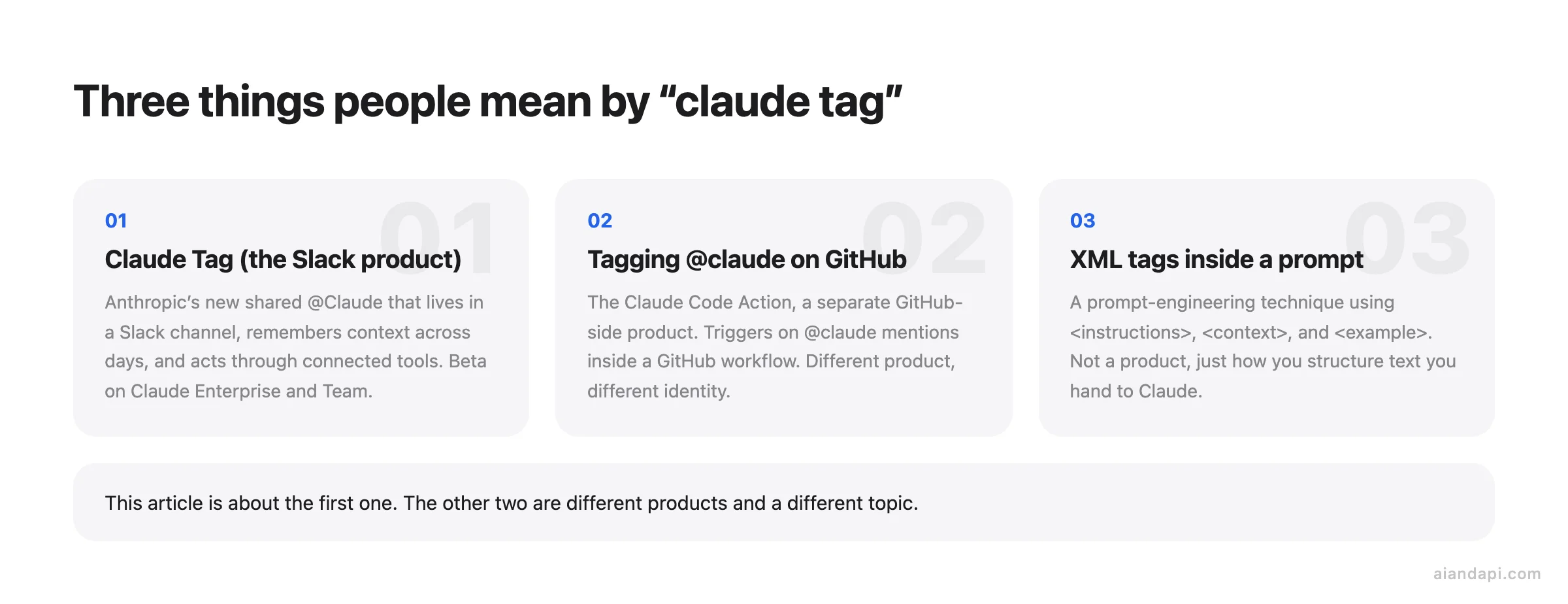
- Tagging
@claudein a GitHub issue or pull request is the Claude Code Action, a separate GitHub-side product from theanthropics/claude-codestack. It is not what Anthropic announced this week. - XML tags like
<instructions>,<context>, and<example>inside a Claude prompt are a prompt-engineering technique, not a product.
The fastest way to place Claude Tag against Anthropic's other tools is the framing Cat Wu, Anthropic's head of product for Claude Code and Cowork, gave Fortune: "Claude Code, Cowork, and chat are very single-player, whereas Claude Tag is built to be interactive and multiplayer." Claude Code runs in one developer's terminal. Cowork runs in one user's browser. Claude in chat answers one user at a time. Claude Tag is the first one of these that is supposed to sit in a channel where everyone can see what it does and pick up where the last person left off. TechCrunch's coverage calls it an always-on Claude that lives in Slack and acts as an AI teammate.
For anyone who has used Claude Code or Cowork before, Anthropic's own framing is that Claude Tag should feel familiar. Same model family. Same tool-use behavior, but reshaped for a group chat instead of one person's session. Anthropic positions it as the beginning of an evolution of Claude Code: more proactive, and tuned to work alongside a full team rather than one user at a time.
Concretely, the day-to-day difference from Claude Code or Cowork is that the unit of work changes from one session to one channel. In a Code terminal, you describe a bug, Claude reads files, opens a PR. When you close the session, that context is gone and the next teammate starts from scratch. In Claude Tag, the same bug discussion plays out in #release-week, and on Thursday the on-call engineer can ask "what did we decide about that retry logic Monday" without re-pasting the thread. Claude already saw it. The other shift is identity. A PR opened from a Code terminal goes up as the engineer who ran the command, whereas a PR opened by channel-resident Claude Tag goes up as the Claude GitHub App, with the requesting engineer recorded in the audit log rather than on the commit author line.
Who can use Claude Tag right now
Claude Tag is in beta for two plans only: Claude Enterprise and Claude Team. The product page and the launch post both state this plainly. If your org is on Pro, Max, or the free tier, you cannot enable Claude Tag yet. No waitlist trick, no individual upgrade path. You need a Team or Enterprise seat, which already bundles Claude on web, desktop, mobile, and Claude Code in the terminal under one subscription.
"Claude tag for teams" is two different questions. People searching that phrase usually mean one of:
- The Claude Team plan. Yes, this is the plan that gets Claude Tag in beta, alongside Enterprise.
- Microsoft Teams the chat app. No. Claude Tag launched on Slack only. Anthropic picked Slack because much of its own day-to-day work happens there, and has said the goal is to expand "to the many other places teams work." As of 2026-06 there is no Microsoft Teams version and no announced date. The "Three lookalikes" section below walks through workable interim options for Teams users.
Inside a channel: shared identity, memory, ambient mode
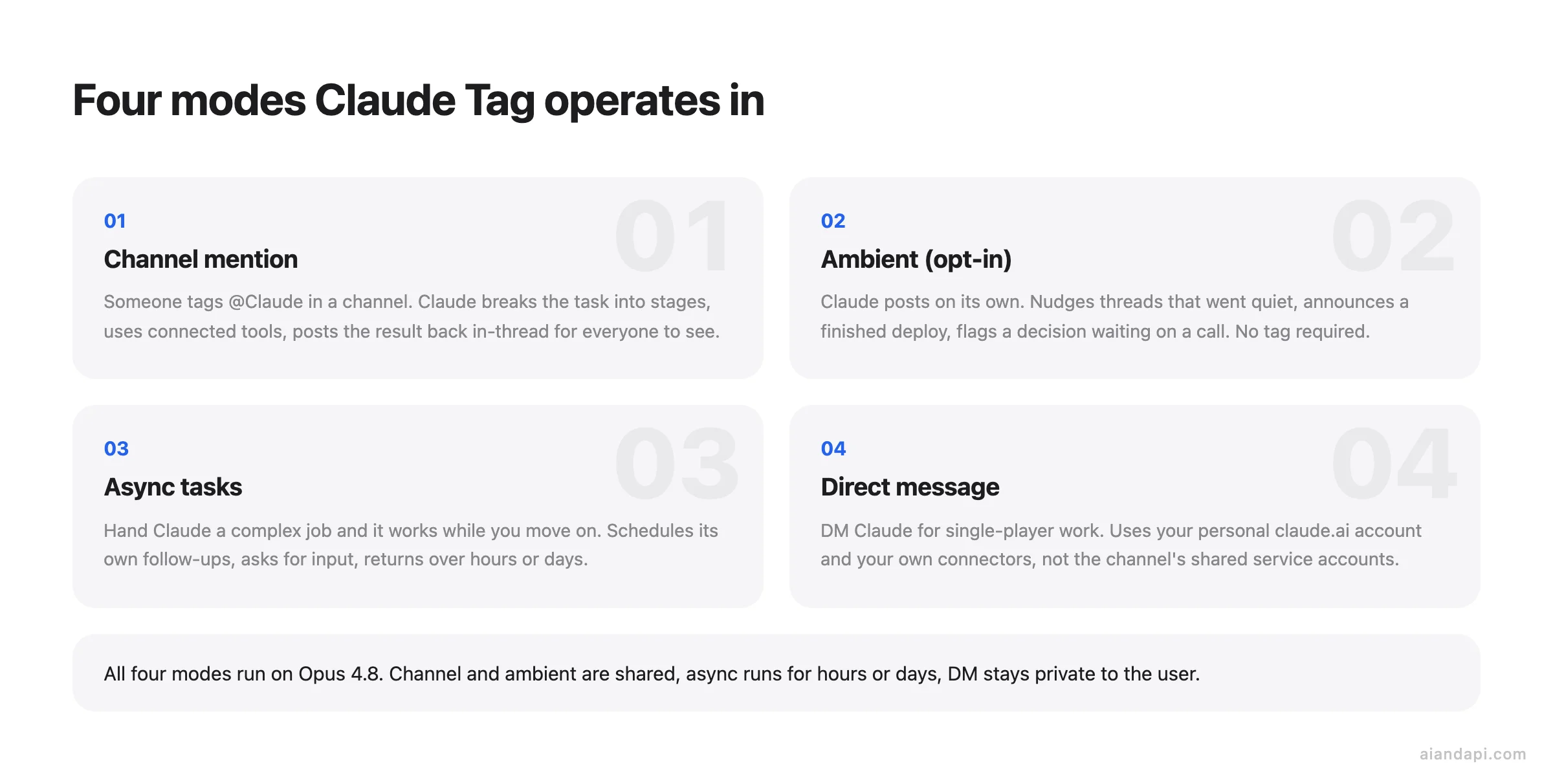
Picture a product manager in #release-week on a Thursday afternoon, typing: "@Claude, summarize what we decided this week and draft the customer email." Within a few seconds Claude posts a reply in-thread. It has read back through the channel, pulled out the three shipping decisions made on Monday and Wednesday, listed the two open questions, and attached a draft email below. All visible to everyone in the channel, not piped to a private DM. When tagged, Claude breaks the request into stages, works through them using the tools it has access to, and responds in a Slack thread with what it has created. The PM doesn't have to recap Monday's standup, because Claude was already in the channel watching it happen.
That last part is the conceptual shift from the old Claude in Slack app. Within a given Slack channel there is one Claude that interacts with everyone (a shared channel identity). Anyone in the channel can see what it's working on and pick up where the last person left off, and the work product is a shared resource: what matters surfaces to the whole channel, not just the person who asked. Anthropic frames it as "working with a real colleague, one that can produce work in public view, with far greater context and understanding than before." The practical effect is that the channel itself becomes the workspace, and Claude is a participant in it rather than a private assistant each teammate has to brief separately.
Memory is the other half of that shift. As Claude follows along with its channel it builds context about the work, so users don't need to explain things from scratch each time. Context can draw on previous conversations and memory across days. What happened in Monday's standup is still there on Thursday, without anyone repeating it. TechCrunch describes this as a layer of persistent context and memory that previous Slack tools couldn't maintain, which is the cleanest way to think about why this looks different from a chat bot that forgets between sessions.
Anthropic has not published the underlying mechanism. Whether each channel runs against a growing context window, a retrieval index over message history, a summarized memory store, or some combination remains undisclosed. The launch materials describe the behavior (cross-day recall, scoped to admin-defined channels, optional cross-channel learning with permission) but not the architecture, and what happens when a channel's history grows past whatever the limit is (summarization, eviction, truncation) is not documented either. Treat the memory as a black box with two confirmed properties: it persists across days within a channel, and it stays inside the channels an admin defined unless explicitly granted cross-channel permission. If the architecture matters for your security review, raise it with Anthropic support before relying on assumptions.
The fourth behavior is ambient mode, and it is opt-in. With ambient enabled, Claude posts on its own initiative. It flags relevant information from across the channels it's in, follows up on threads or tasks that have gone quiet, and surfaces what the team might need to know without waiting to be tagged. A thread where someone asked for design review and never got an answer gets nudged back to the top. A deploy that just finished gets announced. TechCrunch's coverage describes it as Claude "proactively jumping into chat" to keep the team updated.
Alongside channel mentions and ambient posting, two other modes round out how Claude operates. Tasks can run asynchronously: hand Claude a complex task and it works while you move on, follows up, asks for input, or comes back when it's done, scheduling work for itself and pursuing a project over hours or days. And direct messages keep the single-player workflow available. DM Claude and it responds privately, using the personal tools and connectors that user has set up rather than the channel's shared ones. Under all four modes the model is Opus 4.8, Anthropic's current top-end Opus release as of 2026-06.
What teams actually delegate to Claude Tag: examples by function
At Anthropic, 65% of the product team's code is written by their internal version of Claude Tag, the same product readers are evaluating, just running inside the company that built it. That number sets the floor for what serious delegation looks like, and the team has pushed the pattern well past engineering into product metrics, support tickets, and root-cause debugging on tricky bugs (Anthropic).
The most common first move on any team is the thread summary: tag @Claude on a long #release-week thread and ask "what got decided, what's still open, who owns what." Claude posts back decisions, open questions, and the people waiting on each. Usually the lowest-friction way to prove the integration to a skeptical channel before anyone touches code.
The bigger lift is standing instructions, which let @Claude act without being mentioned each time. Tell it to watch a channel, run a Friday digest, flag anything tagged urgent, or page the on-call. From there it surfaces the thread that went quiet, posts when the deploy is live, and flags the decision waiting on a call.
| Function | Channel | What someone tags or stands up | What Claude posts back |
|---|---|---|---|
| Engineering | #release-week | "Summarize what we shipped this week and draft the changelog." | A dated changelog draft plus the three bugs still open. |
| Support / Ops | #support-triage | Standing instruction: "Flag any ticket mentioning billing within 5 minutes and page on-call." | A real-time ping with the ticket link and a one-line root-cause guess. |
| Sales / CS | #pipeline-q3 | "What did we agree with Acme on pricing across this thread?" | The pricing decisions, open asks, and which AE owns the follow-up. |
| Product / PM | #feature-x | Standing instruction: "Weekly digest every Friday: decisions made, open questions, blockers." | Friday digest post with three sections, names attached. |
| Leadership | #exec-staff | "Pull the product metrics we discussed Monday and compare to last week." | A number-by-number diff with the threads where each metric was set. |
How an admin sets up Claude Tag and migrates from Claude in Slack
Before touching Slack, check who is doing the setup. Only a Primary Owner or Owner of your Claude organization can pair a workspace and create Access bundles. These are Owner-only writes. The Admin role can open the settings screens and read everything, but the final "create" buttons are greyed out, so a workspace IT person without org Owner rights will get stuck on step 1. Confirm the right person is logged into claude.com/docs/claude-tag before you start.
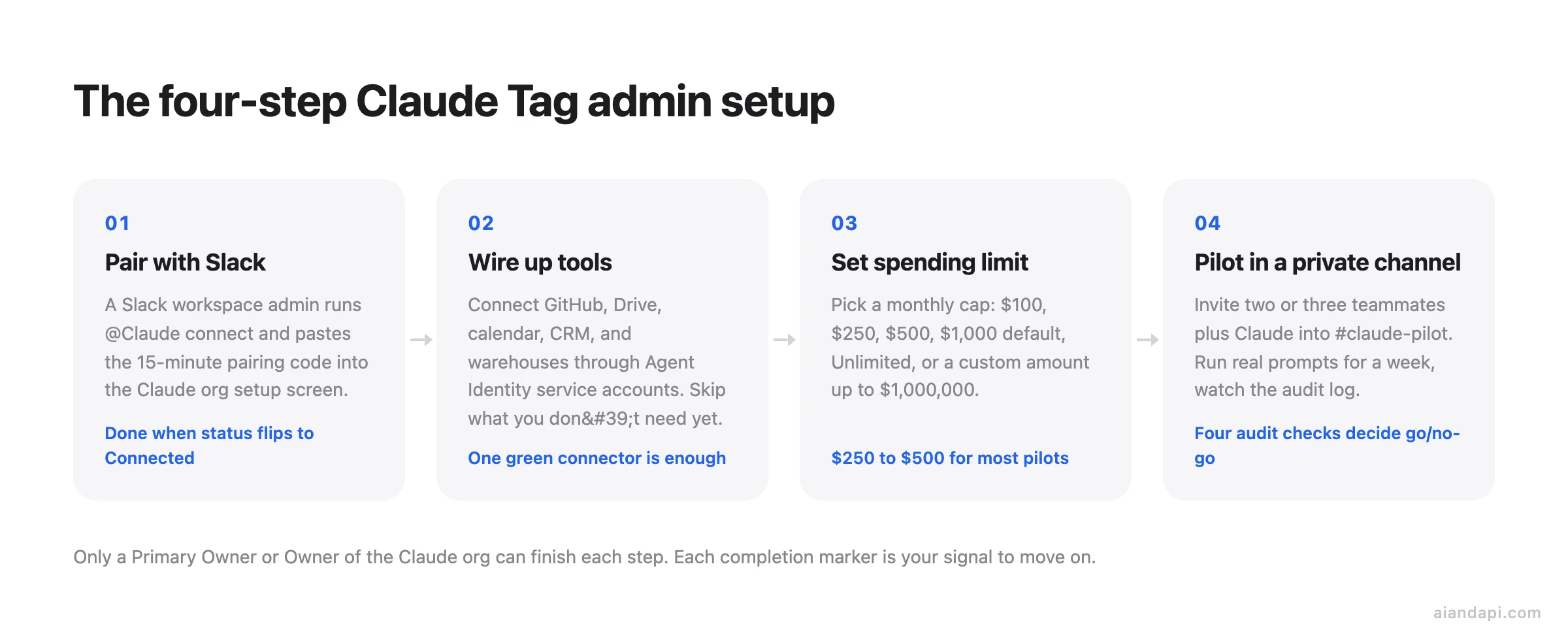
The setup itself is four ordered steps. Treat each completion marker as the signal to move on.
-
Pair Claude Tag with your Slack workspace. In Slack, a workspace admin runs
@Claude connectin any channel. Claude responds with a pairing code that is valid for 15 minutes. Paste it into the Claude org's setup screen before it expires. The "Claude (workspace name)" status flipping to Connected in the Claude admin panel is your done marker. Note the role split here: the person running@Claude connecthas to be a Slack workspace admin, while the person pasting the code has to be a Claude org Owner. If those are two different humans, get them on a call. -
Give Claude access to your tools. This is the part where you wire up GitHub, Google Drive, calendar systems, your CRM, and data warehouses through Agent Identity service accounts. Open the connectors you actually want this Claude to act on, and leave the rest for later. You are done with step 2 when at least one connector shows a green status alongside Slack.
-
Set a monthly organization spending limit. The dropdown offers $100, $250, $500, $1,000 (the default), Unlimited, or a Custom amount up to $1,000,000. Pick a number you would be comfortable seeing on next month's invoice if every team starts tagging Claude on day one. $250 or $500 is the realistic pilot range for most orgs. Unlimited is for shops that already have token-spend monitoring elsewhere. The number is not load-bearing for security (per-channel caps and the audit log do that work), it is purely a financial circuit breaker. Save the limit. Step 3 is done.
-
Test in a private channel before you announce anything. Create a
#claude-pilotprivate channel, invite two or three teammates plus Claude, and run three or four realistic prompts: a thread summary, a standing instruction, one ambient-mode trigger. Watch the audit log for that channel during the first week to confirm Claude is only touching the tools and data you expect. The next list spells out exactly what to check before you widen the rollout.
Four audit-log checks that decide go/no-go after the pilot week. "Nothing surprising appears" is too loose for a security or finance sign-off. Walk this list explicitly:
- Connector scope. Every tool call hit a connector you listed in step 2. (Any call to a Drive folder you didn't whitelist or a GitHub repo outside the pilot org is a hard fail, revoke the Agent Identity binding before widening.)
- Per-channel spend versus cap. The pilot channel's token spend landed comfortably below its per-channel cap. (If three teammates in one channel burned 50%+ of the cap in a week, the org-wide cap will not hold once 20 channels are live, raise the cap or tighten standing instructions first.)
- Failed-action rate. Connector errors and refusals are in the low single digits. (A handful per week is normal, transient API failures, permission mismatches. Double-digit failures from the same connector mean that Agent Identity is misconfigured and a real channel will surface user-visible breakage.)
- Requester-to-action mapping. Five spot-checked entries each tie cleanly to a human requester and a findable Slack thread. (The whole defensibility of the model rests on that linkage. Any orphan action, most likely a standing instruction firing in a channel you forgot it was watching, gets documented and resolved before rollout.)
When all four pass for the pilot week, step 4 is done. If any one fails, fix the cause inside the pilot channel before inviting the next team.
Migrating from the old Claude in Slack app. Anthropic has set one hard deadline: August 3, 2026. On that date the existing Claude in Slack app fully switches over to the Claude Tag experience. The working migration plan:
- Cut over before August 3, 2026. Admins who want to move sooner can opt in within the 30-day migration window from their org's notification date, same process, just earlier. After August 3 the old app's behavior is gone whether you are ready or not.
- Re-wire Agent Identity bindings. Slack workspace pairing carries over (you don't have to reconnect the app), but GitHub, Drive, calendar, and CRM connectors are a Claude Tag setup step and get wired in step 2 of the four-step setup above.
- Export anything from the old app you want to keep. DM history and custom standing instructions configured against the old app are not confirmed to migrate automatically. (Anthropic's launch materials describe Claude Tag standing instructions as a Claude Tag construct without referencing inheritance from the old app, and have not published a line-by-line carry-over manifest.) Screenshot or export DM threads and prompts now.
- Run the four-step setup in a pilot channel first. Treat August 3 as the day you should already be running on Claude Tag, not the day you start.
The strongest pilot recipe pulls all of this together: run the four-step setup against a #claude-pilot private channel, give Claude Tag one week of real work, sit through the four audit-log checks above, then decide whether to widen the rollout.
What Claude Tag costs
Claude Tag has no separate sticker price. It is bundled into Claude Team and Claude Enterprise. The @Claude line item shows up as a feature on the Claude pricing page, not as a SKU. Your actual bill comes from token spend, which admins cap with the per-organization monthly limit set during setup ($100, $250, $500, $1,000, Unlimited, or a custom amount up to $1M).
The billing model splits along one clean line: channel work is billed to the organization, while direct messages are charged to the individual Claude user account behind the DM. Practically, a PM asking @Claude in #release-week draws from the org's monthly cap. The same PM messaging Claude privately about their own calendar draws from their personal Claude usage. Admins doing capacity planning should size the org cap for channel traffic only.
For launch, Anthropic is issuing an introductory credit to eligible Enterprise and Team orgs so the whole company can try Claude Tag without burning the first month's spend cap. Anthropic has not published a dollar figure. Check your org's billing console or the support article for the amount applied to your account.
One caveat for anyone googling Team plan pricing: third-party guides disagree on whether Claude Code is included in Team Standard. CloudZero says Team Standard at $25/seat ($20 annual) includes Claude Code at Pro-level limits; see CloudZero for seat minimums. Finout says it does not, and that Claude Code only ships with Team Premium, Enterprise, Pro, or Max. That conflict affects Claude Code seat economics, not Claude Tag eligibility. Team Standard still gets Claude Tag. Confirm Claude Code inclusion against your seat tier in the Claude Code support article before assuming.
Enterprise admins doing total cost of ownership math should also know the usage-based Enterprise plan has no per-seat usage limits. Consumption is billed at API rates. As of June 2026, that is the only public Anthropic-side documentation of how Claude Tag's token spend lands on the Enterprise invoice.
What Claude Tag can reach: Agent Identity, connectors, and the channel-vs-DM split
Claude Tag uses two different credential models depending on where you talk to it. In a channel, Claude operates under workspace-level service accounts that an admin wired up during setup. Its own identity, not yours. In a DM, Claude runs on your individual claude.ai account and uses your personal connectors. Anthropic calls the channel side Agent Identity: Claude has its own accounts for the tools it touches, tied to the workspace rather than to whoever tagged it.
That distinction matters because it determines what Claude can see and what shows up in audit trails. A channel-resident Claude opens a pull request as the Claude GitHub App, not as the engineer who asked. A DM-side Claude reading your calendar is reading your calendar, with your tokens.
Here is what's wired up for the launch:
| Connector | Surface | How it connects |
|---|---|---|
| Slack | Channel home, posts as the Claude app | Native, set up during pairing |
| GitHub | Opens PRs and comments | Claude GitHub App via Agent Identity |
| Google Drive | Read/write on shared org content | Service account during setup |
| Calendar systems | Read events, schedule | Service account during setup |
| CRM connections | Query and update records | Service account during setup |
| Data warehouses | Query for product/sales analytics | Service account during setup |
| Anything else with an API | Any channel | Configure via Agent Identity |
The launch list is a floor, not a ceiling. Any tool with a public API can be exposed to Claude through Agent Identity once an admin connects it. On the DM side, your own personal connectors travel with you: useful for the email draft you don't want a whole channel reading, or a SaaS seat only you hold a license for.
This is a different thing from tagging @claude on GitHub itself, which is the Claude Code Action.
Security and governance: scoped identities, audit log, private-channel rule, spend caps
Security review of Claude Tag turns on two questions: what can the bot reach, and what record exists of what it did. The four controls that answer them:
- Audit log of every @Claude action. Admins see the requester, the channel, the tool call, and the result for every action @Claude took in the workspace. That single record is what makes the rest of the model defensible, every action ties back to a human and a channel, and it is what turns the four audit-log checks in the setup section into a real go/no-go gate rather than security theater.
- Per-channel credential isolation. Each Claude identity, including its memories, stays inside the channels an admin defines. A sales-Claude does not pass memories to engineering, and engineers cannot reach sales data through it. (Per Anthropic's Agent Identity blog post, credentials are stored independently, mapped to the channel identity, and injected at the network boundary at request time, so a legal-work Claude can't seed memories into an engineering channel the way Anthropic and TechCrunch describe.)
- Private channels stay private. Claude does not report from private channels, regardless of cross-channel permission grants. (Cross-channel memory itself is opt-in: with explicit permission Claude gathers facts from other channels and data sources to inform its work, an Anthropic statement frames this as Claude "learning ever more about the work" as it follows along; without that permission it stays put. The private-channel carve-out overrides the permission.)
- Org-wide and per-channel spend caps. Admins set token-spend limits for the organization and for individual channels. The per-channel cap is what lets security or finance contain a runaway prompt loop to a single channel's budget rather than the whole org's.
Two more controls round out the picture:
- Retention. Slack conversations with Claude stay separate from Claude web history. They auto-delete within 30 days if the integration disconnects; otherwise they follow Slack's retention policies. Disconnecting Claude Tag is, in effect, a 30-day countdown to the data being gone.
- Enterprise add-ons for regulated industries. Enterprise plans add HIPAA readiness, SCIM provisioning, audit logs at the compliance grade, a compliance API, custom data retention, role-based access control, and a 500K context window, per CloudZero's plan breakdown. These are what decide whether Claude Tag clears a regulated-industry review or stays inside a pilot channel.
Where Claude Tag sits versus Copilot, Salesforce, Glean, and Viktor
The contest in this category is not "which model is smartest." It is which surface holds the team's organizational context and does work there. Claude Tag's bet is that Slack is that surface. The channel is where decisions actually happen, so the teammate should live in the channel. Each rival places the same bet on a different surface or a different layer of the stack.
| Product | Surface | Memory / context model | Primary integration anchor | Posture |
|---|---|---|---|---|
| Claude Tag | Slack channels and DMs | Per-channel scoped identity with persistent memory; admin-defined boundaries | Agent Identity service accounts; Slack-native | Multiplayer teammate visible to the whole channel |
| Microsoft Copilot / Work IQ | Microsoft 365 (Teams, Outlook, SharePoint, Office) | Microsoft Graph as the context layer across the M365 tenant | Microsoft Graph | Assistant inside Microsoft surfaces |
| Salesforce Slackbot | Slack | Salesforce records as the source of truth | Salesforce CRM | Assistant anchored to CRM data |
| Viktor | Standalone product (startup) | Virtual coworker concept, less battle-tested at scale | Custom per deployment | Teammate-style, early stage |
| Glean | Glean app + connectors into other surfaces | Enterprise search index across Confluence, Jira, GitHub, Drive, Slack, Salesforce | Glean's own retrieval layer between model and data | Intelligence layer that any model can plug into |
Fortune's launch coverage puts Salesforce's Slackbot and Viktor in the same Slack-resident teammate bracket as Claude Tag. TechCrunch frames the broader race as a fight over who owns organizational context, with Snowflake and Databricks lining up on the back end as the warehouses that hold the tacit knowledge agents will eventually tap. Not direct competitors to Claude Tag, but the layer underneath it.
The one concrete head-to-head number available comes from Glean itself. In a blind evaluation of roughly 280 complex enterprise queries published in 2026, human graders preferred Glean's answers for correctness 1.6 times more often than Claude's (and 1.9 times more often than ChatGPT's). The methodology: a randomized five-point preference scale with four graders plus cross-checking by Glean's AI quality team. The Claude setup ran Sonnet 4.5, not Opus 4.8, which is what Claude Tag uses, connected to Confluence, Jira, GitHub, Drive, Slack, and Salesforce. Two caveats matter before quoting this number to anyone: Glean published it, and the Claude configuration was not Claude Tag itself. Treat it as a vendor-run signal that retrieval quality is Glean's claimed edge, not as a neutral benchmark.
No comparable independent number exists for ChatGPT-for-Slack or for Microsoft Copilot against Claude Tag yet, and inventing one would be worse than admitting the gap.
Three lookalikes that are not Claude Tag
Three near-identical phrases still send people to the same search results page.
"I'm on Microsoft Teams, not Slack." Claude Tag is Slack-only at launch. Three workable options exist, none of them a drop-in replacement:
- Anthropic's first-party Microsoft 365 connector is available on every Claude plan including Free. It is search-only and runs inside claude.ai. You query SharePoint, OneDrive, Outlook, and Teams data from a Claude chat window, not from a Microsoft Teams channel. Useful for retrieving Teams content, useless for replicating the ambient-teammate posture.
- Third-party toolkits such as Composio's Microsoft Teams connector for Claude Cowork expose Teams operations (send a channel message, reply to a message, manage members) to a different Anthropic product, Cowork. Cowork is the single-player tool Claude Tag was built on top of, so this gets you messaging plumbing but not channel-resident memory.
- Wait. Anthropic has stated Slack is the start, not the endpoint.
"I tagged @claude on a GitHub PR." That is the Claude Code Action, a different product. The action activates on @claude mentions, issue assignments, or explicit-prompt automation inside a GitHub workflow, and supports four auth paths: Anthropic direct API (key or workload identity federation), Amazon Bedrock, Google Vertex AI, and Microsoft Foundry. Easiest setup is to open the Claude terminal and run /install-github-app, which walks the GitHub App install and secrets. Slack @Claude is Claude Tag. GitHub @claude is the Claude Code Action. Different surfaces, different identities, different billing.
"I thought 'claude tags' meant the XML tags in prompts." Those are a prompt-engineering convention, not a product. Anthropic's prompting best practices recommend wrapping content in <instructions>, <context>, and <input> when a prompt mixes instructions, context, examples, and variable inputs, and wrapping examples in <example> tags (multiple in <examples>) so Claude separates demonstration from directive. A community run on r/ClaudeCode reported a 13% lift in correct answers and a 6% drop in hallucinations on Opus 4.5 when the same prompt was rewritten from markdown to XML tags. That is a single Reddit author's test, not an Anthropic benchmark. Directionally consistent with the official guidance, but treat the percentages as a hint, not a number to quote in a planning doc.
Rough edges at launch
This is a launch-week product, and the published incident coverage doesn't actually name it. The Anthropic compute-shortage and Claude Code rate-limit stories floating around right now predate Claude Tag and concern Claude Code quotas, not channel behavior. There is no neutral post-mortem of Claude Tag uptime to point at, so any "Claude Tag caused outages" claim is, for now, unsourced.
The community signal is louder than the verified flaws. On the r/ClaudeAI launch thread, users blamed the launch for recent outages and dismissed the product as a "gimmick". One of the highest-voted replies asked whether this replaces "the [old Claude in Slack app] that continually fails to keep up with the chat". Treat both as sentiment about a beta, not as a verified product defect. The other loud complaint, "all us poor bastards in Teams are SOL," is a scope decision, not a product gap.
The honest posture, given the Anthropic-internal track record (65% of the product team's code, as of 2026-06) against the launch-week beta reality: pilot it small, watch the audit log, then decide.
Frequently asked questions
What is Claude used for in a Slack-team setting?
Inside a Team or Enterprise Slack workspace, Claude Tag handles the work that used to bounce between DMs and meeting notes: summarizing long #release-week threads, drafting changelogs and customer emails from the decisions made that week, watching a #support-triage channel for billing tickets and paging on-call, pulling product metrics into an #exec-staff thread, and running a standing Friday digest in a product channel. The shared channel identity means the output is visible to the whole team rather than buried in one person's DM, and the persistent channel memory means nobody has to recap Monday's decision on Thursday.
Claude Tag vs ChatGPT-for-Slack: which one for a Team or Enterprise rollout?
As of June 2026 there is no neutral independent benchmark comparing the two inside Slack, so the honest answer is decided by what your org is already paying for and where the sensitive data lives. Claude Tag is bundled into Claude Team and Enterprise seats your org may already hold, runs on Opus 4.8, and ties every action back to a human requester through the audit log and Agent Identity. The Glean evaluation cited earlier tested Claude (Sonnet 4.5) against enterprise retrieval queries, not head-to-head with GPT inside Slack, so it doesn't settle the question. Pilot whichever one your security review clears first against the four audit-log checks in the setup section.
Does Claude Tag use the same token quota as Claude Code, or are channels metered separately?
They are metered separately. Claude Tag channel usage draws from the organization's monthly spending limit (set during setup, with options from $100 to Unlimited). Claude Code usage runs against whichever plan seat includes it. The two are tracked independently. The channel-vs-DM split within Claude Tag is also separate: channel work draws from the org cap, direct messages draw from the individual user's Claude account.
How does the shared @Claude channel identity handle conflicting instructions from different users in the same channel?
Anthropic has not documented how Claude arbitrates between conflicting simultaneous instructions from different users in the same channel. Based on the shared-identity model described by Anthropic, Claude works within the standing instructions the admin has set for that channel, and within-thread work is scoped to the active thread. How it resolves two users issuing contradictory requests at the same moment is not in the launch materials. Check the admin documentation or the support channel for behavior on this edge case.
Can users or admins inspect, edit, or reset Claude Tag's channel memory?
The launch materials describe memory as scoped to admin-defined channels and auto-deleted within 30 days if the integration disconnects, but they do not document a UI for inspecting what Claude currently "remembers" about a channel, editing a specific incorrect memory, or selectively resetting one channel's memory without disconnecting the full integration. Disconnecting the integration is the documented path to clearing channel memory. The 30-day deletion then applies. If you need a wrong fact corrected without nuking the whole channel's memory, the practical workaround today is to post the correction in-channel so Claude reads it as new context. Whether the admin console exposes a finer-grained edit or reset flow is not confirmed in Anthropic's launch documentation.
Does the Microsoft 365 connector give Claude Tag ambient access to Teams data, or is it only available in claude.ai?
The Microsoft 365 connector is only available inside claude.ai. It runs from Claude's web interface, not from within a Microsoft Teams channel. It is search-only (SharePoint, OneDrive, Outlook, Teams data) and available on all plans including Free. It does not give Claude Tag ambient channel presence in Microsoft Teams, and it is a separate product from Claude Tag itself. For Teams users who need agent-style presence in their chat surface, as of June 2026 there is no native option. The Composio toolkit covers Claude Cowork (single-player) rather than Claude Tag.
How does an admin enable ambient mode, and can it be scoped to specific channels or topics?
Anthropic describes ambient as an opt-in behavior. Claude only posts on its own initiative when "ambient" is enabled, which implies a per-instance or per-channel toggle rather than a workspace-wide default, but the launch announcement and product page do not show the exact admin-console UI for flipping the switch or scoping which topics, thread types, or event sources Claude is allowed to surface. The documented controls are channel-level: each Claude identity (and therefore its ambient behavior) stays inside the channels admins define, and per-channel spend caps bound how much proactive posting it can do before hitting the budget. Topic-level whitelists or blacklists are not described in the public launch materials, so practically: scope ambient by which channels you put Claude into and by the standing instructions you give it in those channels, and verify the precise toggle path in your Claude admin console once the workspace is paired.